Mocha TN5250
- 3.5
- Rating
- 10.00K
- Installs
- $28.99
- Price
 Analysis by App-foxy
I approached Mocha TN5250 as a practical communication tool rather than a general-purpose mobile app. Its job is focused: it gives an Android device access to AS/400 systems through TN5250 terminal emulation. That narrow purpose immediately explains both its appeal and its limits. If your daily work still depends on IBM i screens, menus, and text-based business applications, having that environment available on a phone or tablet can be genuinely useful. If you are looking for modern messaging, remote desktop control, or a broad business suite, this is not aimed at you.
In my experience, the value of a terminal app is not about visual polish. It is about whether I can connect, read a familiar screen, enter commands accurately, and finish a small task without reaching for another computer. MochaSoft has kept this release centered on that workflow. The app belongs to the Communication category, carries an Everyone age rating, and is currently at version 6.0. It has been available since October 14, 2010, which gives it a long history compared with many mobile utilities.
How the everyday AS/400 workflow feels
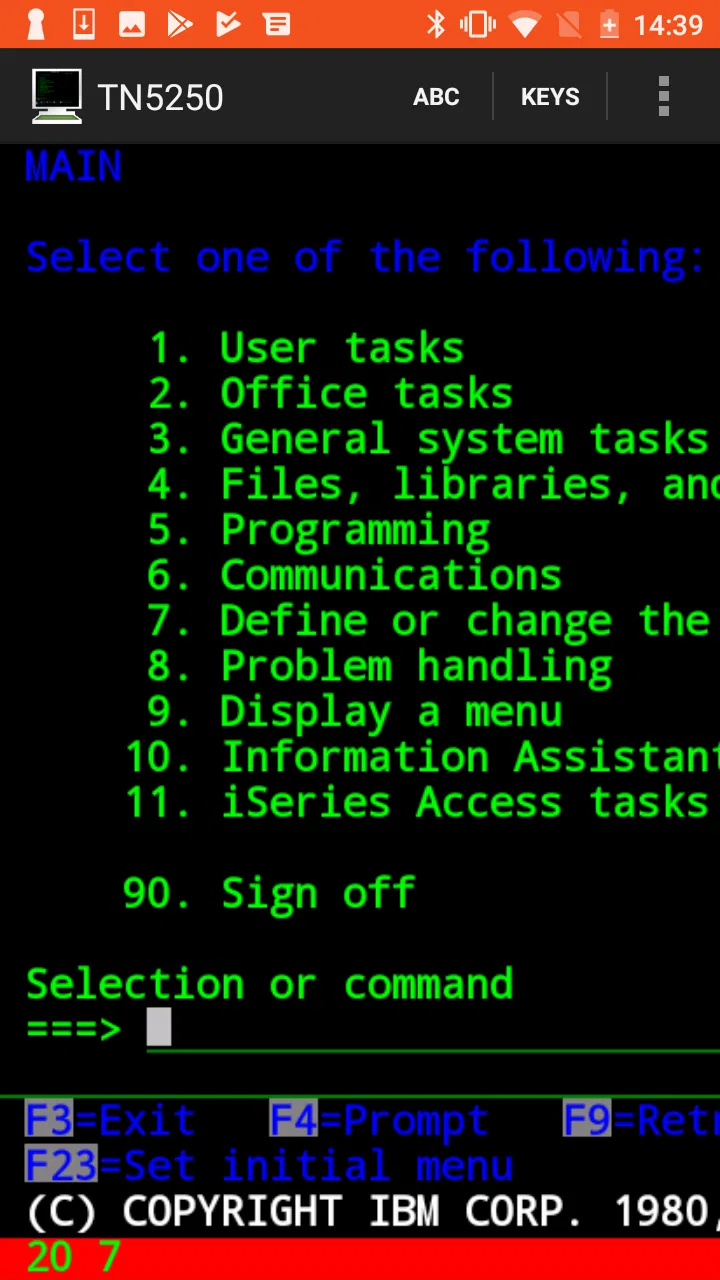
The most sensible way to use this app is to treat the phone as a portable terminal, not as a replacement for a full workstation. I would open it when I need to reach an AS/400 application while away from my desk, check a record, respond to a work request, or perform a short operational step that does not justify carrying a laptop. The experience is naturally more text-heavy than most modern Android apps, but that is also the point: the screen is meant to represent a host system, not redesign it.
You May Also Like

 Pandora - Music & Podcasts
Pandora’s Music Is Easy to Start, but Harder to Recover
Pandora’s strength is its low-effort path from a seed to a station. Its weak spot is how much confidence it asks you to place in connection, setup, and quiet recovery.

 AccuWeather: Weather Radar
AccuWeather Review: A Quick, Clear Forecast for Everyday Decisions
For everyday plans, the best forecast is the one you can understand quickly. AccuWeather makes rain timing, radar, and local conditions easy to act on, with a few trade-offs.

 Hill Climb Racing
Why Hill Climb Racing Still Turns Crashes Into One More Run
A tiny car, a bumpy hill and one more upgrade: Hill Climb Racing keeps resurfacing because its simple chaos makes every near-miss feel personal.

 AliExpress - Shopping App
AliExpress Makes Global Shopping Feel Personal, but Shoppers Bear the Risk
AliExpress turns a global marketplace into a pocket-sized discovery engine. Its reach is useful, its shopping loop compelling, and its trade-offs easy to miss.

 Lords Mobile: Kingdom Wars
Lords Mobile Is a Kingdom-Building Routine, Not a Quick Match
A case-by-case verdict on the building, battles, device demands, and social commitments that make Lords Mobile rewarding for some players and exhausting for others.

 PDF Scanner app - TapScanner
TapScanner Makes Paperwork Easier to Capture, Check, and Share
TapScanner makes scanning with a phone feel less like a rescue operation and more like a dependable step in getting work done. Its capture tools are useful, though not flawless.
More From Our News Desk
View All News


A realistic example would be a technician visiting a customer site who needs to check an order or confirm an inventory entry. With a suitable network path to the company system, the technician can use the phone to reach the familiar terminal interface instead of calling someone back at the office. I would still prefer a larger screen for long sessions, but for a focused lookup or a quick update, the portability changes the practical value of the old terminal workflow.
The first habit I recommend is to separate connection problems from application problems. If the host cannot be reached, changing terminal behavior will not solve the issue. I would first confirm the network connection and the correct host details, then check whether the AS/400 is available. Only after that would I adjust display or keyboard behavior. This simple order saves time because terminal emulators can otherwise make a basic network issue feel like a configuration failure.
Once connected, the main challenge is input. AS/400 applications often depend on function keys, Enter, field movement, and precise cursor placement. On a physical keyboard, those actions are familiar. On a phone, they compete with the limited space available for the text screen. I found that accuracy matters more than speed at the beginning. Tapping carefully, checking the active field, and pausing before submitting an entry is safer than trying to move quickly through a form.
A tablet is a more comfortable choice when the session involves several fields or repeated navigation. A phone is better suited to short checks, emergency access, and situations where portability matters more than comfort. That distinction is important because the app itself cannot remove the basic limitations of a small touchscreen. It can provide the terminal connection, but it cannot make a dense legacy screen feel like a modern mobile form.
MochaSoft is the developer behind the app, and the product has reached over ten thousand installs with an average rating of three and a half from around ninety ratings. I read that as a sign of a specialized tool with a defined audience rather than a mass-market utility. The rating does not make me dismiss it, but it does reinforce the need to judge it against your actual AS/400 workflow instead of expecting the convenience of a mainstream remote-access app.
What I would prepare before relying on it
Before using the app for an important task, I would write down the connection details and the exact sequence needed to reach the relevant host screen. That preparation is especially useful when the terminal session is only one part of a larger job. I would also test the workflow from the same location where I expect to use it. A connection that works comfortably on an office network may not behave the same way on a mobile connection or a guest network.
I would not make the first test a high-pressure task. Instead, I would sign in, move through a harmless screen, confirm that the keyboard behaves as expected, and exit cleanly. This gives me a chance to discover whether the screen is readable and whether important keys are easy to reach. It also helps identify whether the phone is suitable at all. Some users will find the interface manageable immediately; others will decide that a tablet or physical keyboard is necessary.
Settings that deserve attention
Terminal emulation is one of those areas where small configuration choices have a large effect. I would spend time checking the connection setup, the terminal presentation, and the way keyboard input is handled before judging the app. The correct choices depend on the host environment, so I would avoid changing several options at once. Adjusting one setting, testing a known screen, and then keeping or reversing the change is a more reliable method.
Display behavior is the first area I would review. Text-based host screens can become uncomfortable when the characters are too small, while enlarging everything may force more scrolling or make a full form harder to see. My preferred approach is to find a compromise that keeps field labels readable without making navigation cumbersome. A tablet gives more room to make that compromise, but a phone can still work for short sessions if the display is configured thoughtfully.
Keyboard handling deserves even more attention than appearance. The app is useful only when I can reproduce the actions expected by the AS/400 application. I would test Enter, field movement, backspace, and the function-key workflow on a non-critical screen. If a task depends on a particular key sequence, I would repeat it several times before trusting the setup. This is one of the less obvious lessons with terminal software: a connection can look successful while the input method remains impractical.
The best setup is the one that reduces mistakes, not the one that looks most compact. A tightly packed screen may appear efficient, but if I regularly hit the wrong key or lose track of the active field, it slows the job down. I would rather give up a little visible content and gain confidence in every entry. That trade-off matters when the host application was designed around precise keyboard interaction.
Another useful habit is to keep a short note describing the settings that work for each host or work context. This is not a feature claim about the app; it is a workflow improvement. Companies sometimes maintain more than one AS/400 environment, and the most comfortable arrangement for one may not be ideal for another. Recording the working arrangement prevents repeated trial and error, especially when the app is used only occasionally.
The price is $28.99, so I would evaluate the purchase more carefully than I would a casual utility. For someone who needs reliable mobile access to an AS/400, that cost can be reasonable because the app serves a specialized professional purpose. For someone who only wants to experiment with terminal emulation, it is a much harder recommendation. The value depends almost entirely on whether the app solves a real access problem in your routine.
Faster patterns for repeat users
After the initial setup, speed comes from repeating a reliable sequence rather than rushing individual taps. I would begin each session with the same checks: confirm the connection, open the expected host environment, verify the current user context, and then move to the task. This routine may sound slow, but it prevents the common mistake of entering information on the wrong screen or assuming that a previous session ended where I remember.
For frequent lookups, I would keep the required navigation path beside me until it becomes familiar. AS/400 applications often reward users who remember the order of menus and fields. The app does not need to provide a modern navigation layer for that knowledge to be useful. In fact, the fastest experienced users are usually the ones who understand the host application well enough to minimize unnecessary movement.
I would also divide tasks into two groups: read-only checks and changes that affect business records. Read-only work is a good way to build confidence with the mobile layout. Updates deserve a deliberate pause before the final submission. On a small screen, it is easy to mistake a nearby field or overlook a value that would be obvious on a larger monitor. My rule would be to review the entire line or form before committing any change.
When a physical keyboard is available, I would use it for long sessions. A phone paired with a keyboard can make terminal entry more comfortable, but the practical benefit depends on the keyboard and the workspace. I would not assume that a mobile setup will reproduce every convenience of a desktop terminal. Instead, I would use the app for mobility and reserve extended data entry for a larger device whenever possible.
There is also a useful distinction between emergency access and routine production work. Emergency access means checking a status, confirming a value, or handling a short action while away from the office. Routine production work means spending a large part of the day inside the host system. Mocha TN5250 makes more sense in the first situation and for selected parts of the second. If your role involves hours of continuous terminal use, a desktop or dedicated workstation will usually be easier on your eyes and hands.
One of the more practical ways to improve reliability is to create a personal “stop point” habit. Before leaving a session, I would finish the current transaction, return to a known screen when appropriate, and close the connection intentionally. That makes the next session easier to understand and reduces uncertainty about whether an operation was completed. It is a small discipline, but it matters more on a mobile device where interruptions are common.
Where the app reaches its limits
The biggest limitation is not a missing cosmetic feature; it is the age and design of the environment being accessed. TN5250 emulation connects the mobile device to an AS/400-style terminal experience, but it does not transform that experience into a modern touch application. Users who expect responsive cards, visual dashboards, or simple mobile forms may find the interface demanding even when the connection works correctly.
Touch input is another real compromise. Function-heavy workflows are easier when the user has a physical keyboard and a stable cursor. On a phone, the same task can involve more visual checking and more careful tapping. That is acceptable for a short, familiar procedure, but it becomes tiring when the work involves many screens. I would not recommend buying the app solely on the assumption that mobile access automatically means comfortable mobile productivity.
It is also important to understand the difference between terminal access and remote desktop access. If you need to see a Windows desktop, open a graphical accounting program, or control a full office computer, a remote desktop client is the better category of tool. If you need a browser-based business portal, a secure browser may be more appropriate. This app is the right choice only when the destination is specifically an AS/400 terminal environment that can be reached through TN5250.
Security and access procedures should be considered at the workplace level. I would follow the organization’s rules for credentials, network access, and mobile devices rather than treating a phone as automatically suitable for sensitive work. The Everyone rating describes the app’s age suitability, not the sensitivity of the business information viewed through it. That distinction is easy to miss and worth keeping clear.
The app’s long availability can be reassuring for users who depend on an established terminal workflow, but it does not guarantee that every modern Android device or every host configuration will feel identical. I would test the exact device, network, and AS/400 environment before making it part of a critical process. That is especially true for organizations where a failed connection could delay field work or an important operational decision.
Another trade-off is specialization. A focused terminal emulator can be preferable to a broad remote-access product because it keeps attention on the host session and avoids the overhead of controlling an entire computer. On the other hand, a broader solution may be better if your work regularly crosses between terminal applications, desktop tools, files, and web services. Choosing between them depends on whether you need one precise doorway or a complete remote office.
Who should use it and who should pass
I would recommend Mocha TN5250 to an AS/400 operator, field technician, support worker, or business user who occasionally needs direct terminal access away from a desk. It is particularly suitable for people who already understand the host application and need portability more than a redesigned interface. Familiarity with the AS/400 workflow makes the app much easier to appreciate because the user already knows what the screens and keys are meant to do.
I would be more cautious for a beginner who has never used an AS/400 system. The app can provide access, but it does not replace training in the host application. A new user may struggle with both terminal navigation and mobile input at the same time. In that case, learning on a larger screen with guidance from an experienced colleague would be a better starting point.
I would also skip it if the goal is general remote work. The price is difficult to justify for someone without a specific TN5250 requirement, and the specialized interface will feel unnecessarily restrictive for ordinary communication or office tasks. Even among experienced users, anyone who spends most of the day entering records should compare the phone experience with a desktop terminal before deciding that mobile access is enough.
The app is available for Android devices running at least Android 5.1, which covers a broad range of older hardware. Still, operating-system compatibility is only one part of the decision. Screen size, keyboard comfort, network reliability, and the exact host workflow will determine whether the experience is genuinely practical. I would judge those factors together rather than relying on the minimum system requirement alone.
My verdict after settling into the workflow
Mocha TN5250 is a specialized tool that earns its place when the problem is specific: reaching an AS/400 terminal from an Android device. I like that its purpose is clear, and I can see real value in using it for field checks, short updates, and occasional access when a workstation is unavailable. The strongest results come from users who prepare their connection, tune the display and keyboard behavior, and follow repeatable habits instead of treating the app like a casual mobile utility.
My reservations are equally clear. The touchscreen is not a perfect substitute for a physical keyboard, dense host screens can be tiring, and the app will not help users who actually need graphical remote desktop access. The $28.99 price also makes the decision personal: it is sensible for a real AS/400 access requirement, but excessive for curiosity or occasional experimentation.
With an average rating of three and a half, the app sits in a middle position rather than presenting itself as an effortless universal solution. That feels fair to me. Its usefulness depends heavily on the environment around it, especially the host system and the user’s familiarity with terminal work. I would test a complete, low-risk workflow before relying on it for important operations.
My final recommendation is straightforward: if your work already lives on an AS/400 and you need a portable terminal, this is worth considering. Set it up patiently, test the keys that matter, use a tablet or physical keyboard when the session becomes demanding, and keep a consistent start-and-stop routine. If your needs are broader than TN5250 access, choose a remote desktop or another communication tool instead. For the right user, Mocha TN5250 is not flashy, but it can be a practical bridge between a legacy business system and everyday mobile work.
FAQs for Mocha TN5250
01What is Mocha TN5250 used for?
Mocha TN5250 is a mobile terminal-emulation app designed to connect Android or iOS devices to IBM i, AS/400, and other systems that support TN5250 connections. It lets users access text-based business applications remotely, view menus and screens, enter commands, and work with legacy enterprise software without needing a traditional desktop terminal. It is mainly intended for business, administration, warehouse, and support environments.
02Does Mocha TN5250 require an IBM i or AS/400 server?
Yes, the app needs access to a compatible host system that provides a TN5250 service. Installing the application alone does not provide access to business software or databases. Before downloading, users should confirm that their organization’s IBM i, AS/400, or other supported server is configured for TN5250 connections and that they have the correct host address, port, login credentials, and permissions required by their system administrator.
03Can Mocha TN5250 connect securely over the internet?
Mocha TN5250 may be used across networks, but the security of the connection depends on the available configuration and the organization’s infrastructure. Users should avoid exposing an enterprise host directly to the public internet and should follow their administrator’s requirements, such as using a VPN, firewall rules, or an approved secure network. Check the app’s current feature list to confirm which encryption or security options are supported by your version.
04Is Mocha TN5250 easy to use on a phone or tablet?
The app is built for touch devices, but TN5250 interfaces are traditionally designed for physical keyboards and function keys. Basic navigation can be handled through the on-screen controls, while longer sessions may be more comfortable on a tablet or with an external keyboard. Users should expect a practical business tool rather than a modern graphical app, and may need time to adjust to terminal-style screens and keyboard commands.
05Is Mocha TN5250 free, and are there any limitations?
Availability, pricing, and included features can vary between the Android and iOS versions, as well as between trial and paid editions. Some versions may limit session time, functionality, or access to advanced options until the app is purchased. Before installing, review the store listing for the current price, supported operating systems, in-app purchases, and update history. Also confirm that your device and server meet the app’s compatibility requirements.
Pros
- Reliable TN5250 emulation for accessing IBM i systems remotely.
- Supports customizable keyboard layouts for faster terminal navigation.
- Session settings can be saved for convenient repeated connections.
- Works well for text-based business applications with low data usage.
- Offers useful terminal features such as screen capture and copy/paste.
Cons
- The interface feels dated compared with modern productivity apps.
- Initial connection setup may be confusing for users unfamiliar with IBM i.
- Advanced configuration options are limited compared with desktop emulators.
- Small-screen typing can be difficult during long terminal sessions.
- Some features may require a paid upgrade or separate licensing.

Mocha TN5250
Gallery